
Did you know that walking into a digital store and finding no one to help is incredibly frustrating? Modern consumers want immediate answers.
When a website forces them to wait for an email or navigate a confusing phone menu, they simply take their business elsewhere.
To solve this, companies use AI chatbots.
These intelligent virtual assistants offer constant support. They ensure users never have to wait for basic information again.
Let’s learn more about exactly what an AI chatbot is, how it works, and why businesses use them to improve customer experiences.
What Is an AI Chatbot?
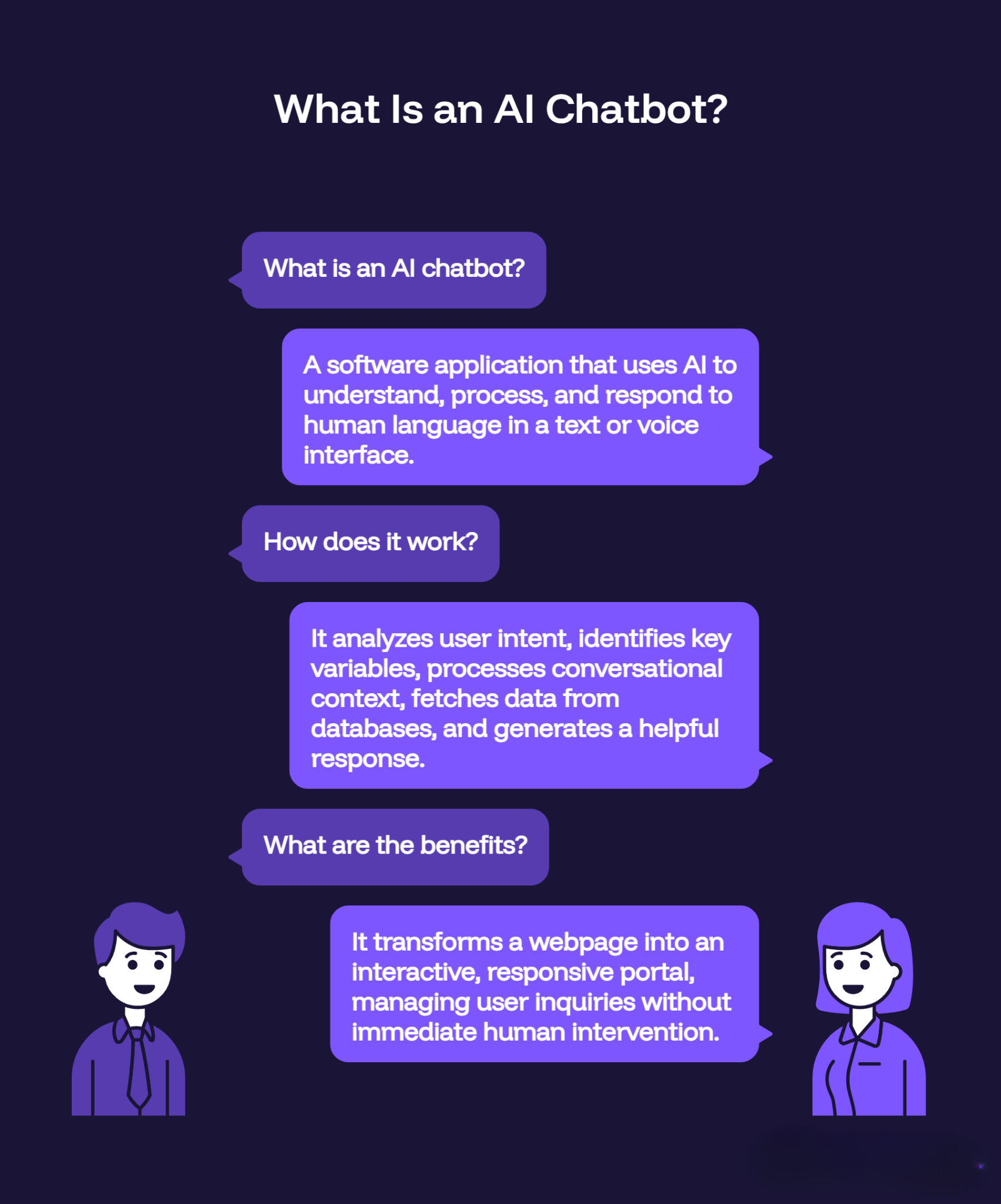
An AI chatbot is a software application. It uses artificial intelligence to understand and process human language through text or voice. Unlike older software that relied on strict scripts, modern AI understands user intent and gives accurate answers.
In customer service, this software acts as an automated front line. It is embedded right into a website or app to handle questions without a human agent.
When a visitor opens the chat window, the system analyzes their phrase to find the actual goal. It then creates a helpful reply based on company data. This turns a standard webpage into an interactive portal.
So now we know what AI chatbots are, let’s learn how AI chatbots actually work.
How Does an AI Chatbot Work?
To understand how AI chatbots work, you must look past the conversational user interface and examine the underlying technology.
Here is exactly what happens when a customer hits send.
1. Natural Language Processing (NLP)
First, the software breaks down the raw text. It strips away messy punctuation, fixes typos, and finds the core grammatical structure of the sentence.
2. Intent Recognition
Next, it figures out what the user actually wants. If someone types “My package is late” or “Where’s my stuff?”, the AI maps both phrases to one simple goal: track_shipment.
3. Entity Extraction
Then, it hunts for specifics. In the sentence, “Cancel subscription for account 5543,” the goal is cancellation of the entity, Account 5543.
4. Large Language Model (LLM) Processing
Modern bots route this data through an LLM. This gives the AI context. It understands slang, nuance, and messy phrasing that would instantly break older, traditional systems.
5. Knowledge Base and API Integration
Now it needs facts. The chatbot searches your internal knowledge base or queries external databases via API. Need an account balance? It securely pulls that exact number.
6. Response Generation
Finally, it builds the reply. It packages the raw data into a natural, conversational sentence and displays it on the screen in a fraction of a second.
Types of AI Chatbots
Not all bots are built the same. Businesses choose different models based on the complexity of their workflows and the specific goals of their support departments.
Generative AI Chatbots
These platforms build responses dynamically in real time. Powered by advanced language models, generative AI systems compose unique sentences based on the specific context of the conversation. They handle highly complex, multi-turn dialogues and adapt their phrasing to match the user’s tone, making them ideal for detailed technical assistance and nuanced troubleshooting.
Retrieval-Based AI Chatbots
Retrieval systems rely on a predefined repository of answers. When a question arrives, the artificial intelligence analyzes the text to find the most accurate matching response from an existing database of help articles and policies. This model gives businesses strict control over their exact phrasing, making it highly valuable for industries with rigid legal or compliance standards.
Hybrid AI Chatbots
A hybrid system combines the structural control of retrieval models with the flexibility of generative AI. It uses strict rule-based paths for standard procedures, such as processing a refund or resetting a password, but switches to generative language modeling when a user asks open-ended questions that fall outside standard parameters.
AI Chatbots vs Traditional Chatbots
The technical divergence between traditional rule-based software and genuine conversational AI dictates how effectively a system can resolve user problems without human intervention.
| Feature | Traditional Chatbots (Rule-Based) | AI Chatbots (Conversational AI) |
| Core Mechanism | Decision trees and rigid if/then logic | NLP, machine learning, and language models |
| Input Understanding | Requires exact keyword matches or button clicks | Comprehends natural phrasing, typos, and intent |
| Conversation Flow | Strictly linear; users must follow pre-set paths | Fluid and contextual; handles topic switches easily |
| Learning Ability | Static; requires human developers to update code | Dynamic; improves over time based on interaction data |
| Setup Complexity | High manual mapping of every single conversational path | High initial training on company documentation |
Traditional chatbot automation software functions like a digital phone menu. It presents the user with a set of buttons or options, such as “Check Order Status” or “View Store Hours.” If a customer types a direct question that does not perfectly align with those pre-programmed options, the system breaks, offering an error message like, “I’m sorry, I didn’t understand that.”
Conversely, an AI customer support bot interprets the meaning behind irregular phrasing. It allows the customer to speak naturally, removing the frustration of navigating restrictive menus and significantly increasing the rate of automated issue resolution.
AI Chatbots vs Human Support Agents
When comparing AI chatbots vs human support agents, deploying automation does not mean eliminating human support staff. Instead, optimizing customer service requires understanding how these two assets complement one another.
- Availability and Scaling: An AI chat support tool operates 24/7/365 without breaks, holidays, or shift changes. It can simultaneously manage thousands of unique user conversations, ensuring zero wait times during sudden traffic spikes. Human agents have fixed operational hours and can generally manage three to five chats concurrently before performance drops.
- Handling Complex Scenarios: Human agents excel at emotional intelligence, critical thinking, and advanced negotiation. When a customer is upset about a complex billing discrepancy or requires a customized enterprise contract, a human agent can navigate the emotional landscape and make subjective decisions. AI software operates logically and cannot evaluate grey areas.
- Cost Efficiency for Repetitive Tasks: The vast majority of incoming support volume consists of simple, repetitive inquiries, such as tracking shipments, updating passwords, or checking refund windows. Assigning these to human agents incurs high labor costs and creates employee burnout. Automation handles these programmatic tasks instantly for a fraction of the cost.
Benefits of AI Chatbots
Why do businesses invest in this tech? For measurable operational returns. Implementing AI chatbot software for customer service yields measurable operational returns.
Businesses use this technology to achieve specific, quantifiable improvements across multiple departments.
Immediate Response Times
The modern consumer defines speed in seconds. While email tickets drag on for hours and phone queues test customer patience, an AI help desk software widget delivers answers instantly. This immediacy eliminates user frustration at the exact moment it occurs, keeping buyers engaged.
Drastic Reductions in Operational Costs
When an automated system resolves a high percentage of incoming inquiries, the total volume of tickets reaching human queues plummets. This deflection allows companies to scale their customer base significantly without needing to hire a corresponding number of support representatives, lowering overhead.
Elimination of Human Error in Data Delivery
Human agents can make mistakes, quote outdated policy versions, or mistype order details. An AI chatbot pulls factual data directly from your verified knowledge base and live databases. This guarantees that every customer receives uniform, highly accurate information every single time.
Increased Lead Generation and Sales Conversions
An AI chatbot for website deployment does not sit passively waiting for text. It tracks user behavior and triggers proactive messages based on specific actions. If a visitor lingers on a pricing page or leaves an item in an ecommerce shopping cart, the software can offer an immediate discount or answer a product question, converting a passive browser into a buyer.
AI Chatbot Use Cases
Every industry uses automation differently to solve its own bottlenecks.
Ecommerce
Protect margins and drive sales.
- Tracking Shipments: Syncs with logistics to give real-time updates.
- Product Recommendations: Acts like a digital personal shopper right in the chat.
- Managing Returns: Automatically generates shipping labels and verifies return windows.
SaaS (Software-as-a-Service)
Keep users logged in and happy.
- Interactive Troubleshooting: Walks users through error codes step-by-step.
- Feature Discovery: Points out hidden dashboards based on what the user asks.
- Onboarding Guidance: Helps new sign-ups set up their accounts fast.
Healthcare
Streamline the digital waiting room.
- Scheduling Appointments: Patients book doctors right in the chat.
- Prescription Refills: Routes standard medication requests straight to the pharmacy.
- Basic Symptom Sorting: Directs patients to self-care, a clinic, or the ER based on clinical guides.
Education
Help students faster without adding admin staff.
- Admissions Navigation: Instantly shares application deadlines and tuition rates.
- Course Selection: Suggests optimized class schedules based on major requirements.
- Instant Academic FAQs: Answers campus policy questions at 2 a.m.
When Should AI Transfer to Human Agents?
An optimal support strategy relies on knowing precisely when to move a conversation away from automation. Forcing a user to remain stuck in an automated loop when a bot cannot solve their problem ruins the customer experience.
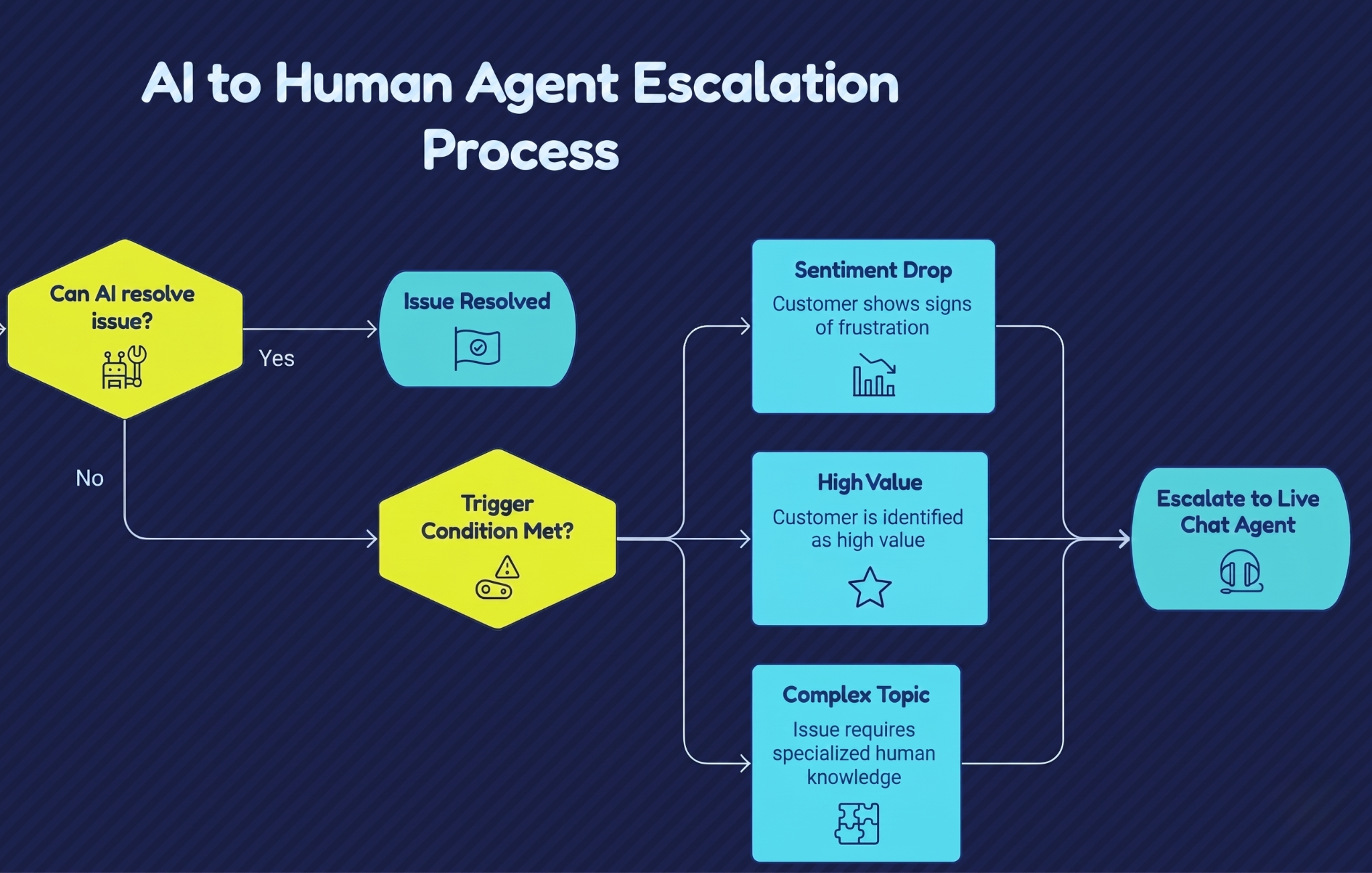
A handoff must happen under specific conditions:
- Negative Sentiment Detection: Advanced AI reads the room. If a customer types in ALL CAPS or uses aggressive words, the bot quietly tags a live agent.
- High-Value Accounts: VIP clients shouldn’t talk to robots. Route your enterprise accounts directly to a dedicated human for white-glove service.
- Complex Requests: Sometimes a problem is too messy. If an issue requires multiple steps and lacks a clear database answer, the AI passes the baton.
Pro-tip: When this handoff occurs, the software must transfer the complete conversation history to the agent’s dashboard.
This ensures the human representative can read the full transcript immediately, preventing the customer from having to repeat their story.
Common AI Chatbot Mistakes
Many businesses fail to see a positive return on their automation investments because they commit fundamental implementation errors.
Recognizing these common mistakes is essential for maintaining brand reputation.
- Failing to Provide a Clear Exit Route: Never trap a user. Always provide a visible button or command to reach a human immediately.
- Poor Knowledge Training: A bot is only as smart as its database. Feed it outdated manuals, and it will confidently give your customers the wrong answers.
- Simulating Human Identity: Don’t trick people. Be honest. Tell your users they are speaking to an automated assistant to build trust.
- Ignoring Interaction Analytics: Launching is just step one. Review your chat logs regularly to spot questions your bot missed, then update your knowledge base.
How AI Chatbots Improve Customer Support
It all comes down to wait times.
Old support is asynchronous: you submit a ticket and wait which often leads to friction. AI-powered customer support is synchronous. It happens right now. By answering standard questions instantly, you kill small frustrations before they grow. Plus, by automating the repetitive 80% of daily inquiries, your human team finally gets the time to solve complex, high-stakes problems.
Best AI Chatbot Software
Selecting the best live chat software requires matching your specific operational requirements with the technical capabilities and pricing structures of available tools.
SupportSuite247
SupportSuite247 is an all-in-one customer support platform built specifically to help growing businesses optimize their digital communication infrastructure. The software combines a highly responsive, easy-to-install website chatbot widget with an enterprise-grade unified inbox and advanced artificial intelligence capabilities.
The platform allows support teams to transition seamlessly between automated AI responses, ticket management systems, and direct live chat interactions from a single, centralized screen. It requires no coding experience to set up, making it highly accessible for teams that need to deploy rapid automation without expanding their IT staff.
Intercom
Intercom is a conversion-focused platform popular among software-as-a-service companies. It emphasizes conversational marketing and interactive product tours, allowing brands to send highly targeted outbound messages to users based on specific actions they take inside an application.
Zendesk
Zendesk provides a massive, enterprise-grade help desk ecosystem built for large corporations with complex routing needs. Their automated assistant functions tie deeply into a web of custom ticket routing rules, though the system requires significant administration and technical resources to configure and maintain effectively.
LiveChat
LiveChat focuses heavily on visual widget customization and robust data reporting dashboards. It is frequently used by large ecommerce operations that want to track specific sales conversions directly tied to individual chat interactions.
How to Add an AI Chatbot to Your Website
Deploying an automated assistant requires no complex engineering. Most modern platforms utilize a streamlined installation workflow to get your system live within minutes.
Step 1: Choose Your Core Platform
Select a provider that matches your scaling goals and workflow complexity. Register your account with a comprehensive tool like SupportSuite247 to gain immediate access to both the automated widget and the backend agent dashboard.
Step 2: Connect and Train the AI
Before exposing the bot to live visitors, upload your company support materials. Input your customer service FAQs, return policies, product manuals, and internal knowledge base documents. The software will ingest this data to form its response framework.
Step 3: Customize the Visual Interface
Design the user-facing elements within the platform dashboard. Select colors that match your company brand, upload a clear avatar photo or logo, and write a concise, transparent welcome message that informs users they are interacting with an automated assistant.
Step 4: Embed the JavaScript Code Snippet
The platform will generate a unique snippet of JavaScript code. Copy this code and paste it directly into the HTML backend of your website, specifically right before the closing </body> tag. If your site runs on a Content Management System like WordPress or Shopify, you can completely skip the code adjustment by installing the provider’s official native plugin instead.
Step 5: Test and Go Live
Run test interactions inside the chat window to confirm the system retrieves data accurately from your knowledge base. Once verified, activate the queue to allow the system to begin managing live visitor inquiries.
Future of AI Customer Support
The evolution of customer support automation points toward complete operational integration, where the boundaries between separate communication channels disappear entirely.
- Deep Context-Aware Voice Assistants: The distinction between text-based chat and telephone support will fade. Generative voice intelligence will allow users to have fluid spoken conversations with automated phone support systems that understand colloquial language, accents, and context as accurately as text platforms.
- Predictive Friction Resolution: Instead of waiting for a user to open a website chatbot widget, systems will use visitor tracking analytics to forecast problems. If an algorithm detects a user repeatedly clicking a broken form submission link, the assistant will open automatically with a specific resolution before the user experiences frustration.
- Agent-Facing Co-Pilot Integration: Artificial intelligence will increasingly operate behind the scenes to optimize human workflows. When a complex ticket reaches a live representative, a co-pilot system will read the history, pull necessary data from internal databases, and write draft responses for the agent, driving down resolution times.
- Autonomous Omnichannel Synchronization: Future automation tools will manage customer lifecycles across email, SMS, messaging apps, and live chat simultaneously from a single unified workspace, routing and resolving tickets based on urgency rather than the specific medium the customer chose to use.
Are you interested to learn more about Live Chat and its features? Check out our article on what is live chat, how it works, and why businesses use it.