
A customer messages your business on WhatsApp about a delayed order.
The next day, they open the live chat on your website to check the status.
The agent on chat asks them to explain the issue from the beginning because the WhatsApp thread lives in a different application than the chat log.
This is a problem that damages customer satisfaction faster than almost anything else.
Forcing people to repeat themselves across channels turns minor issues into major frustrations.
Omnichannel customer support solves this fragmentation.
It ties every messaging channel into one continuous history for every customer.
If someone texts your team on WhatsApp and later calls your phone line, the agent answering the call sees the text messages immediately.
Today, we are going to share some of the leading benefits of having an omnichannel customer support integrated with your website customer support department.
But before we dig in the details, we need to first understand what Omnichannel customer support is.
What is Omnichannel Customer Support?
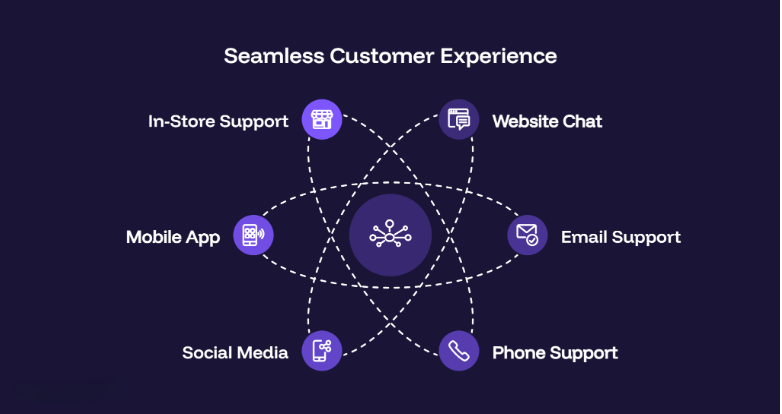
At its core, omnichannel customer support connects all your communication channels such as email, live chat, phone, social media, messaging apps, and in-person into a single unified system.
Instead of treating every channel separately like an isolated island, omnichannel utilize data, context, and conversation history of a specific customer to provide them the same experience journey throughout multiple channels.
There are two types of benefits of omnichannel customer support.
The Customer-Facing Benefits
- Customers Don’t Have to Repeat Themselves
When support channels aren’t connected, every platform may be email, phone, live chat, or social media functions as a closed room with zero memory of the other channel.
So let’s say if you switch from live chat to a phone call, as a customer you will have to step into a brand new room where the agent has a blank slate.
Omnichannel fixes this by replacing separate channel memory with a single central database.
Here’s how it works. Omnichannel gives you the following liberties.
- One Central Customer Record: Every interaction is unified into a single customer profile.
- Instant Agent Context: Agents get a complete customer history the moment they respond.
- One Continuous Conversation: Every channel stays connected as one ongoing conversation.
Because the system stores and displays the full conversation history to whoever handles the ticket, the problem of “bringing the agent up to speed” reduces since the responsibility is taken up by the software.
- No More Efforts to Switch Channels
As a customer, when you shift from one channel to another, you don’t have to worry about the “reset button” and it’s especially helpful when a customer changes devices or messaging apps mid-conversation.
They can easily reconnect with the support experience where they left off.
Here’s the thing, normally if you leave a website’s live chat, that session dies. If you reach out later on WhatsApp, you have to open a new ticket, explain yourself again, and wait for a new agent.
With true omnichannel architecture, the system separates the conversation from the app you use to view it.
What Happened Behind-the-Scenes?
Behind the scenes, every interaction is connected to a single customer profile, unified across all communication channels, and continuously synced in the cloud for uninterrupted conversations.
- Customer Tickets Get Resolved Faster
Cutting down resolution time for customers can remove the “friction period” aka the wasted minutes at the beginning of every support interaction.
This way, agents can solve more problems rather than actually spending time in administrative setups and related tasks.
When channels and customer data are disconnected, agents have to spend the first 2 to 3 minutes of every interaction playing detective.
In a traditional setup, an agent’s workflow would look something like this:
- Ask for the customer’s full name, email, order number, or account ID.
- Type that info into a separate CRM or database to look up their account.
- Ask the customer to describe their issue from scratch.
- Search internal knowledge bases or past tickets to see if this was discussed before.
In an omnichannel system, data lookup happens automatically before the agent even says hello.
Computer-Telephone Integration (CTI) or web widget identification matches the incoming phone number, email, or logged-in user session to their account.
For an agent, the screen automatically shows their identity, order history, and active tickets.
That 2-minute administrative setup drops to zero seconds. If an average call takes 6 minutes, cutting 2 minutes of fluff instantly reduces Average Handle Time (AHT) by ~33%.
- Deliver Consistent Experience Throughout Chat
What does consistent experience mean? It means the customer gets the exact same quality of help, tone of voice, and official rules regardless of how or where they contact you.
Here’s the thing about support channels operating in silos…
Companies often fall into the trap of accidentally creating double standards.
Your public channels like Twitter get fast and friendly responses to avoid bad PR, however, your email tickets get slow or automated responses.
An omnichannel system prevents this by focusing on three core areas:
- Unified Knowledge Base: One trusted source for consistent answers.
- Universal Routing: Every inquiry follows the same workflow and SLAs.
- Consistent Brand Voice: Standardized responses across every channel.
In short, it stops your support team from feeling like five different companies with the same logo.
The Business & Operational Benefits
- It Gives You Unified Agent Workspace
As an agent, the last thing you want is to deal with a cluttered screen.
Unified Agent Workspace is all about cleaning up that clutter and giving you relief from all the mental chaos support agents face almost daily.
With no omnichannel environment, an agent’s desktop can easily feel like a mess of open browser tabs and separate apps.
One window for corporate email, another for live web chat, one more desktop app for phone calls, a dashboard for Twitter/X direct messages, and a separate CRM software to look up customer accounts.
Sounds frustrating just reading through it, doesn’t it?
An omnichannel workspace collapses all of those tools into a single dashboard interface.
How it Appears in Practice?
Instead of switching between five different software tools depending on where a customer reaches out, the agent logs into one single platform (like SupportSuite247, Zendesk, Salesforce Service Cloud, or Freshdesk).
Inside this single dashboard, they get:
- Omnichannel Inbox: All customer channels in one queue.
- Built-In Communication Tools: Call, chat, and email from one workspace.
- Universal Agent Status: One status updates across every channel.
It solves two main issues.
Reduce Agent Cognitive Load – by keeping everything in one visual frame so the agent can focus on resolving the customer problem rather than burying themselves in administrative tasks.
Minimize Onboarding Time – So your agents can be trained on one tool, one workflow, one layout, one set of internal macros, instead of 5–6 different software interfaces.
- Your Agent Has Access to 360 Degree Insights
With omnichannel customer support, instead of seeing tiny disconnected snapshots, your agent gets a complete panoramic view of the customer’s entire history with your company.
When support channels are separated, data gets trapped in silos.
In reality, the phone software knows a customer called, the email tool knows they sent a ticket, and the web chat log holds a completely different transcript.
Since none of these systems interact with each other, agents are missing in the big picture.
Instead of viewing interactions as random, one-off events, you can map the exact path a customer takes before making a decision or encountering an issue.
For example, you can see that a customer read a specific help article, started a live chat, dropped off, and then called support two hours later.
Seeing this full path reveals where your processes or website self-service are failing.
Not all channels deliver the same experience.
A 360-degree view lets you cross-reference channel data with customer satisfaction scores (CSAT), resolution times, and cost per ticket.
| What You Can Analyze | Operational Value |
| CSAT by Channel | Discover if customers prefer resolving billing via WhatsApp vs. Phone. |
| Cost vs. Satisfaction | Find out if lower-cost channels (like AI Chat) yield acceptable satisfaction levels compared to live voice agents. |
| Customer Retention Impact | See whether customers who reach out via social media have higher lifetime value (LTV) than those who use email. |
- Smart Routing & Efficient Data Handling
Without smart routing, queries are usually assigned purely by first-come, first-served or landed on whoever happens to check an inbox first.
It leads to what we call, “ticket pass-the-parcel,” where a customer gets transferred multiple times because the first agent wasn’t equipped to help.
Smart routing acts like an intelligent traffic controller sitting on top of all your incoming channels. It doesn’t matter if a customer reaches out via email, phone, or WhatsApp, for the system, it reads the request context and routes it using three simple rules:
- Skill-Based Routing: Connects customers with the right specialist.
- Language-Based Assignment: Routes conversations by language and region.
- Smart Workload Balancing: Distributes requests based on agent availability.
This way, the customer gets connected to the right person on the first try.
- You Secure Higher Retention & Lifetime Value
Last but not the least, this benefit shows the direct link between support quality and company revenue.
Customer Retention is your ability to keep existing customers from switching to a competitor and LTV (Lifetime Value) is the total profit a customer generates over the entire duration of their relationship with your brand.
How Omnichannel Strategy Helps Regain These?
Studies show that the #1 driver of customer loyalty isn’t flashy perks, it’s low effort.
When a customer doesn’t have to repeat themselves, wait on hold, or deal with fragmented support, staying with your brand becomes actually easy.
However, a single bad support experience like being bounced around between agents or waiting days for an email reply is often a trigger that leads to subscription cancellation.
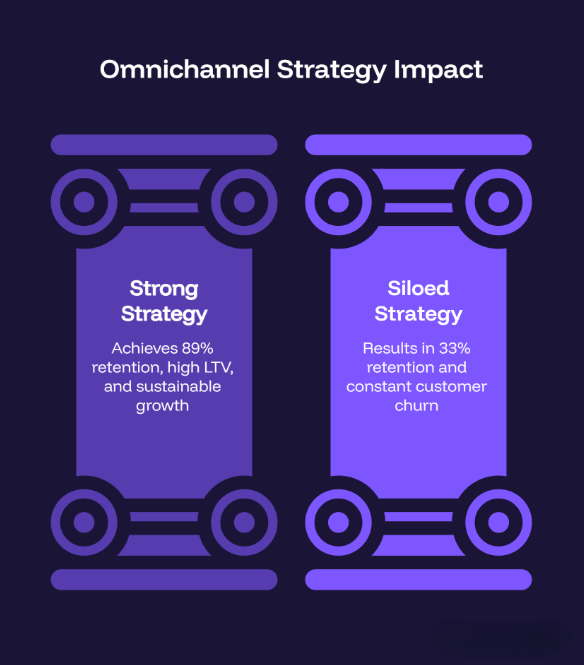
Omnichannel support stops customer churn, directly protecting and expanding your long-term revenue.
Why is SupportSuite247 the Best Choice for Omnichannel Support?
If you’re tired of dealing with traditional chats or siloed experiences for your end customers, it’s time you shift to a better alternative, one that entertains your customers in the best possible way. At SupportSuite247, we offer you a unified omnichannel strategy not as an option, but as a competitive necessity.
Ready to eliminate fragmented support for good? SupportSuite247 is an AI Chatbot support software to take away your worries through complete Customer Support Automation. Check out our flexible Pricing plans or Signup today to elevate your customer experience.
Unlike basic chat tools, SupportSuite247 combines live web chat, AI automation, ticket management, voice chat, and real-time visitor tracking into a single unified workspace. Instead of requiring your team to juggle separate applications for ticketing and chat, all customer conversations, history, and context are accessible from one dashboard.
SupportSuite247 uses a unified customer record system. Whether a customer reaches out via live chat, submits a support ticket, or connects through messaging channels, the software logs all past interactions under their unified profile. Agents can instantly see previous chat transcripts, ticket history, and uploaded files before responding.
Yes. SupportSuite247 offers AI Chatbot Automation capable of handling routine queries 24/7, offering smart replies, and managing automated workflows. When a query requires human intervention, the AI smoothly transfers the ticket or chat thread—along with full context—to the appropriate live agent or department.
SupportSuite247 allows you to create automated routing rules based on query type, language, or department (e.g., Sales, Tech Support, Billing). Incoming requests are automatically directed to qualified agents with open capacity, eliminating manual ticket transfers and speeding up resolution times.
Yes. SupportSuite247 includes built-in voice chat and file sharing directly inside the agent interface on premium plans. If a complex issue cannot be resolved over text, agents can transition to a voice call or request media attachments without sending the customer to an external tool.
The platform includes Real-Time Visitor Tracking, allowing support and sales teams to see which pages a visitor is actively viewing. Agents can initiate proactive chats to assist users before they encounter friction or bounce from the site.
SupportSuite247 is designed for startups, small businesses, and scaling teams. It offers a Forever Free plan for basic setup (up to 2 agents), a Standard plan ($29.99/month for growing teams), and customizable Business plans with advanced AI tools for enterprise scaling.
Setup takes only a few minutes. After creating an account and configuring your department rules, you simply copy and paste the provided chat widget code onto your website. You can also customize the widget’s colors and design to seamlessly match your brand.