
The channel a customer messages you on matters less than what happens in the next few seconds.
Someone asks about a billing issue. Another visitor wants help choosing a plan. A third customer is stuck with a technical problem. If all three conversations land in the same queue and the next available agent simply picks one, your support operation is already making unnecessary decisions manually.
Smart chat routing changes that.
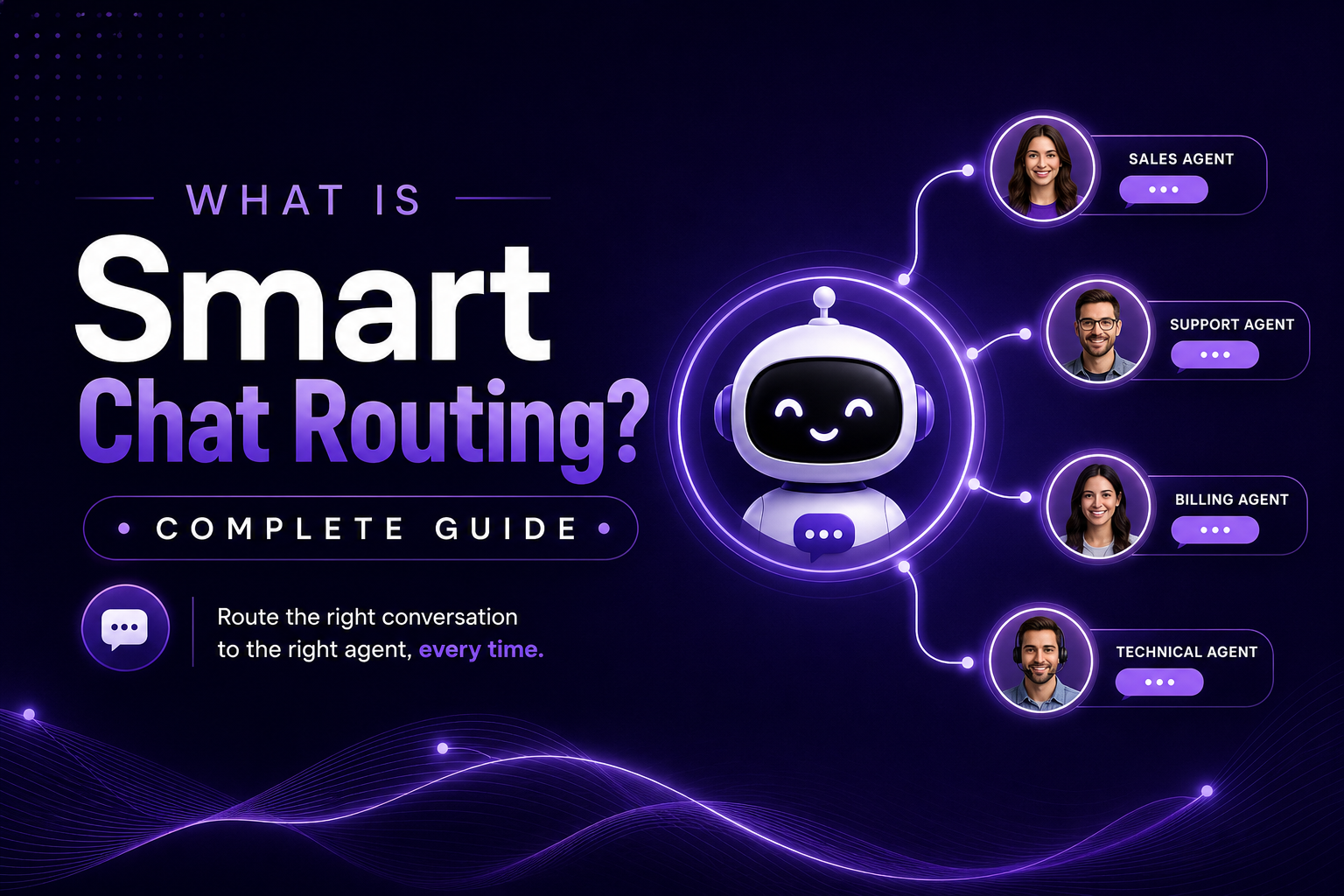
Instead of asking agents to watch a queue and decide what to pick up, the system evaluates each conversation and sends it to the most appropriate agent, department, or automated workflow. It can consider factors such as the customer’s intent, agent skills, workload, language, priority, availability, and previous interactions.
For a growing SaaS company, this can make a meaningful difference. The goal is not to make support feel more automated. The goal is to make the handoff between a customer asking for help and the person capable of solving it much cleaner.
What Is Smart Chat Routing?
Smart chat routing is the automated process of assigning incoming customer conversations to the most suitable agent or team based on predefined rules and real-time information.
A basic chat system might use a simple first-come, first-served queue. A more advanced system can ask several questions before assigning a conversation:
- What does this customer need?
- Which team handles this type of request?
- Which agents have the required skills?
- Who is currently available?
- Who has the lightest workload?
- Is this customer a high priority?
- Has this customer spoken with someone before?
- What should happen if the preferred agent is unavailable?
That distinction matters.
Round-robin routing, for example, might send the first chat to Agent A, the second to Agent B, and the third to Agent C. It is fair, but it does not necessarily produce the best outcome.
Smart routing adds context to the decision.
Modern routing systems can use customer language, topic, identity, channel, agent availability, workload, and other conditions to determine where a conversation should go. Some systems can also decide whether an AI assistant should handle the request first or whether a human should step in immediately.
How Does Smart Chat Routing Work?
The process is easier to understand when you break it into a few steps.
1. A conversation arrives
A customer starts a conversation through your website chat, messaging channel, or another connected support channel.
2. The system collects context
The routing engine looks at available information. This could include the customer’s message, selected category, language, account type, previous conversations, or the page they are visiting.
3. Routing rules are evaluated
The system checks your routing conditions.
For example:
If the customer needs technical support and the account is Enterprise, route to the Enterprise Technical Support team.
Or:
If the customer is asking about pricing, route to Sales unless all sales agents have reached their capacity.
4. The best available destination is selected
The system considers qualified agents and their current availability or workload.
5. The conversation is assigned
The customer reaches the appropriate person without an agent manually searching through a queue.
6. A fallback rule applies if necessary
Good routing does not stop when the perfect agent is unavailable. It should have a sensible fallback.
If your Spanish-speaking technical specialist is offline, for example, the conversation might go to another technical agent with Spanish translation support rather than sitting unanswered.
This fallback layer is important because a routing system that is technically precise but leaves customers waiting is not particularly useful. Modern routing systems commonly combine skills, availability, workload, schedules, and fallback rules.
Smart Chat Routing vs Traditional Chat Assignment
The easiest way to understand the value is to compare how each approach makes a decision.
| Assignment method | How it works | Best suited for | Main limitation |
| Manual queue | Agents choose conversations themselves | Small teams with low volume | Slow and inconsistent |
| Round robin | Chats rotate between agents | Balanced teams and sales | Does not account for workload or expertise |
| Least busy | Sends chats to agents with fewer active conversations | High-volume support | May ignore specialist knowledge |
| Skills-based | Matches conversations to agent expertise | Technical, multilingual, or specialized support | Requires accurate skill mapping |
| Smart routing | Combines multiple signals and rules | Growing support operations | Requires thoughtful configuration |
There is no single routing method that works for every company.
A five-person startup handling 20 chats a day may not need sophisticated routing. A SaaS company with separate sales, onboarding, billing, and technical support teams probably does.
The important question is not whether you have smart routing. It is whether your current assignment process is creating avoidable delays, transfers, or workload problems.
The Main Types of Smart Chat Routing
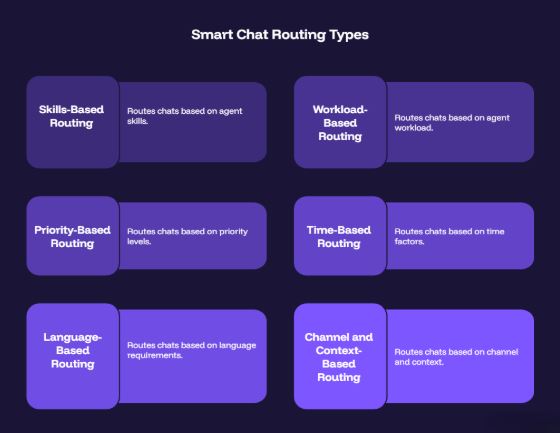
1. Skills-Based Routing
Skills-based routing sends a conversation to someone with the right expertise.
Suppose a SaaS company has these agents:
- Sarah: Billing and subscriptions
- Daniel: API and integrations
- Maria: Spanish support
- James: Enterprise onboarding
A customer asking about an API authentication error should not land with Sarah simply because she is available.
The routing system can identify the technical nature of the request and send it to Daniel.
This can reduce unnecessary transfers and improve first-contact resolution. Skills routing is especially useful when agents have clearly defined areas of expertise.
2. Workload-Based Routing
Workload-based routing looks at how busy agents are right now.
If Agent A has four active conversations and Agent B has one, the next chat can go to Agent B.
This is often more practical than round-robin routing for support teams because conversations rarely take the same amount of time.
One agent might spend two minutes answering a password-reset question. Another might spend 25 minutes troubleshooting an integration.
Counting both conversations as equal does not reflect the actual workload.
Least-busy routing addresses this by distributing new conversations according to current activity.
3. Priority-Based Routing
Not every customer has the same business value or urgency.
An Enterprise customer reporting a service outage may need a different path from a free user asking how to change a profile picture.
Priority routing lets businesses create rules around factors such as account tier, issue severity, revenue value, or escalation status.
The important part is to define these rules carefully. If everything becomes “high priority,” priority routing stops being useful.
4. Time-Based Routing
Your support operation may look different at 10 AM and 10 PM.
Time-based routing can send conversations to the regular support team during business hours and move them to an on-call team, AI assistant, or ticket queue outside those hours.
This is particularly useful for SaaS companies serving customers across multiple time zones.
5. Language-Based Routing
If you support multiple languages, routing can account for language preference.
A French-speaking customer should not have to explain their issue in English before reaching someone who can actually help them.
Language can be identified from a pre-chat selection, customer profile, browser information, or the conversation itself, depending on the platform.
6. Channel and Context-Based Routing
The source of the conversation can also influence the destination.
For example, a website visitor on your pricing page may be a sales opportunity, while someone inside your help center may need support.
A customer coming from a particular product area could also be routed to the team responsible for that product.
This is where smart routing becomes more useful than simply assigning “the next chat.”
Smart Routing and AI: Where Do They Fit Together?
AI and smart routing solve different problems, although they work well together.
AI can handle straightforward questions such as:
“What are your support hours?”
“How do I reset my password?”
“Where can I find the API documentation?”
But some conversations need a person.
A customer might say:
“We’ve been charged twice this month and our account is about to renew. Can someone check this?”
That conversation may need a billing specialist.
A useful AI-powered support workflow can therefore look like this:
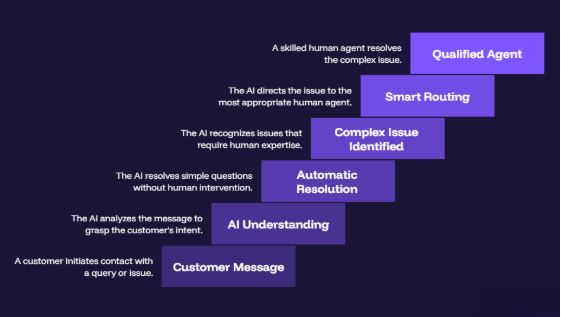
The handoff should carry the conversation history with it. The customer should not have to explain the same problem twice.
Platforms such as SupportSuite247 combine AI automation, human handoff, department routing, and a unified support workspace so conversations can move between automated and human support without creating a separate process for each stage.
This is where Customer Support Automation becomes useful. Automation should remove repetitive work while routing keeps human attention focused where it is actually needed.
What Are the Business Benefits of Smart Chat Routing?
The value of smart routing usually appears in several operational metrics.
Faster First Response Times
If a customer has to wait for an agent to notice and claim a conversation, your response time depends on human attention.
Automatic assignment removes that step.
For SaaS businesses, this matters particularly on high-intent pages. A visitor comparing pricing plans may have a question that determines whether they book a demo or leave.
Fewer Transfers
Poor routing often creates a familiar customer experience:
“Let me transfer you to the right department.”
Then the customer explains the issue again.
Routing by skill, department, or context can reduce this unnecessary movement and get the conversation closer to the right person from the beginning.
Better Agent Utilization
Smart routing can prevent one agent from receiving five conversations while another sits idle.
This matters as chat volume increases because adding more agents is not always the first solution. Sometimes the existing team is simply being distributed poorly.
Better Customer Experience
Customers do not care how your support queue is organized.
They care whether the person responding understands their problem.
Getting a technically accurate answer from the right person in two minutes is a very different experience from waiting ten minutes, explaining everything again, and being transferred twice.
More Consistent Support Operations
Manual assignment depends heavily on individual behavior.
Smart routing turns your support strategy into repeatable rules.
That makes it easier for managers to review what is happening, identify bottlenecks, and adjust staffing or routing rules as volume changes.
When Should Your Business Invest in Smart Chat Routing?
Smart routing becomes more valuable as the complexity of your support operation increases.
You should seriously consider it if:
- You have separate sales and support teams.
- Agents have different areas of expertise.
- You support multiple languages.
- Chat volume changes significantly throughout the day.
- Customers frequently get transferred.
- Agents complain about uneven workloads.
- High-value customers need priority support.
- You operate across multiple time zones.
- AI handles some conversations but humans handle others.
- You are adding agents and the current queue is becoming harder to manage.
If you receive 10 conversations a day and all three agents can answer almost anything, sophisticated routing may be unnecessary.
If you receive 500 conversations a day across sales, billing, onboarding, technical support, and multiple regions, manual assignment becomes difficult to justify.
How to Implement Smart Chat Routing Without Making It Complicated
The biggest mistake is creating too many rules too early.
Start with the problems you can actually see.
First, review your chat history. Look for repeated transfers, long wait times, overloaded agents, and conversations that consistently land with the wrong team.
Then create a small number of meaningful routing rules.
For example:
Rule 1: Pricing questions → Sales
Rule 2: Technical questions → Technical Support
Rule 3: Enterprise customers → Enterprise Support
Rule 4: Spanish conversations → Spanish-capable agents
Rule 5: No qualified agent available → General Support queue
Then measure the results.
Track:
- First response time
- Average wait time
- Transfer rate
- Resolution rate
- First-contact resolution
- Missed conversations
- Agent workload
- Customer satisfaction
Do not optimize one metric in isolation. A routing system that cuts response time but sends complex conversations to poorly matched agents can create more work later.
What Should You Look for in a Smart Chat Routing Tool?
When evaluating platforms, look beyond the phrase “smart routing.”
Ask what the system can actually route on.
Can it route by:
- Agent skills?
- Department?
- Workload?
- Availability?
- Customer type?
- Language?
- Business hours?
- Conversation intent?
- Priority?
- Previous customer history?
Also check what happens when the preferred agent is unavailable.
You want clear fallback rules, conversation history, reporting, and an easy way to modify routing logic as your team changes.
It also helps if routing sits inside the same workspace as your Omnichannel Inbox, Live Chat, and Ticket Management. That keeps assignment connected to the rest of the customer journey instead of creating another isolated support tool.
Is Smart Chat Routing Worth It?
For a small team with low chat volume, probably not yet.
For a growing support organization where customers are routinely waiting, being transferred, or reaching the wrong agent, it can become one of the more practical improvements you make.
The key is to think of routing as an operating decision, not a feature checkbox.
You are deciding who should handle which conversation, how quickly they should receive it, and what happens when they cannot.
That decision affects response times, agent workload, customer satisfaction, and potentially revenue.
If your current process is “someone sees the notification and grabs the chat,” you have room to improve.
If you are evaluating a platform, look at its actual routing controls, reporting, AI handoff, and fallback behavior. SupportSuite247, for example, includes smart routing and departments alongside an omnichannel inbox, AI automation, analytics, and ticket management. Its current plans include a free option and a 14-day trial for the Standard plan.
You can compare the available Pricing options and Signup when you are ready to test how the workflow fits your team.