
A useful customer-support metric isn’t only how quickly an agent responds.
It’s how often the customer needs to contact the company at all.
According to Qualtrics, only 62% of consumers reported having their issue resolved the first time they contacted customer service.
Customers who received a first-contact resolution were also significantly more likely to trust, recommend, and buy more from the company.
That exposes a problem with the way many businesses approach support efficiency.
They optimize the conversation instead of the system behind the conversation.
A faster agent doesn’t solve a confusing product. A chatbot doesn’t fix an incorrect invoice. A shorter queue doesn’t compensate for a customer being transferred between departments.
Real efficiency comes from looking at the entire journey…from the moment a customer encounters a problem to the moment that problem disappears…and finding where unnecessary work enters the system.
That’s why customer support efficiency isn’t just a support-team responsibility.
It’s a cross-department problem.
What Does Customer Support Efficiency Actually Mean?
Customer support efficiency means resolving customer problems quickly, accurately, and with as little effort as possible for both the customer and the support team.
That distinction matters.
If an agent closes 20% more chats because they rush customers off the conversation, that isn’t efficient. If customers immediately reopen those conversations or contact support again, the business has simply moved the workload somewhere else.
A better definition is:
Efficient support = faster resolution + fewer unnecessary steps + less customer effort + consistent quality.
The best way to achieve that is to look at the entire customer journey rather than treating the support department as an isolated function.
1. Start With the Support Department – Remove Repetitive Work
Your support agents should spend most of their time solving problems, not performing administrative tasks.
Start by examining the questions your team receives every week. You’ll usually find a significant percentage of conversations involve predictable requests:
- Where is my order?
- How do I reset my password?
- What are your business hours?
- How do I change my subscription?
- Where can I find my invoice?
- How does feature X work?
“These are prime candidates for Support Automation, saved replies, FAQs, or self-service.”
Build a response library
Create approved templates for recurring questions, but don’t make them robotic.
For example, instead of asking an agent to type a refund-policy response from scratch every time, give them a ready-to-use response that they can personalize.
This reduces typing, improves consistency, and gives agents more time for complicated conversations.
Give agents customer context
Imagine walking into a doctor’s office and having the doctor ask you, “So, what’s your name and why are you here?” after you’ve already filled out your entire medical history.
That’s essentially what customers experience when support agents cannot see previous interactions.
Agents should be able to access relevant information such as:
- Previous conversations
- Customer details
- Orders or subscriptions
- Previous complaints
- Open tickets
- Relevant account information
A centralized support environment eliminates unnecessary back-and-forth and helps agents get to the actual problem faster. This is one of the recurring recommendations across current customer-service efficiency research.
For businesses using live chat, this is especially important because the customer expects the conversation to feel immediate.
2. Use Live Chat to Reduce the Waiting Game
Email has its place. Phone support has its place. But when a customer is already browsing your website and needs help, live chat can remove an entire layer of friction.
Recent LiveChat data covering billions of website visits and more than 2 billion chats found an average first response time of 35 seconds. The same dataset found an average queue wait of 4 minutes and 18 seconds… and a 27.4% queue dropout rate.
That last number deserves attention.
If more than one in four people abandon the queue before speaking to an agent, your support problem isn’t necessarily that your agents are inefficient. You may simply have designed a support process that makes customers wait too long.
A practical live-chat workflow
A more efficient setup looks like this:
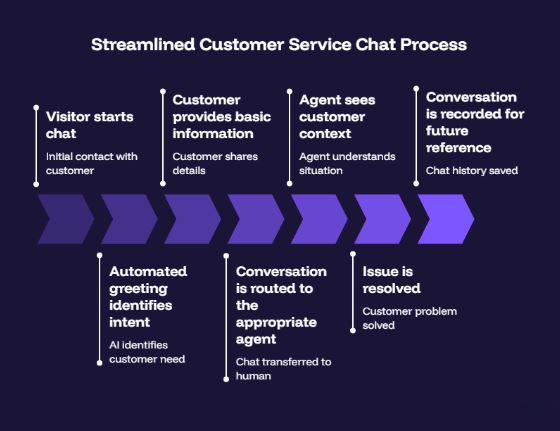
The automation handles the traffic control.
The human handles the relationship.
That’s the sweet spot.
3. Let Automation Handle the Easy Stuff
Automation shouldn’t be used to hide your support team.
It should be used to protect your support team from repetitive work.
For example, a customer might ask:
“What time do you close?”
There is little reason for an agent to manually answer that question 200 times a month.
A chatbot can provide the answer immediately.
But consider a different message:
“I’ve been charged twice, and I’ve already contacted you about this last week.”
That’s different.
The customer is frustrated, the issue may require account investigation, and there is history involved.
That should reach a human quickly.
Talkdesk similarly recommends automating routine interactions such as password resets, appointment scheduling, and order-status queries while keeping complex or emotionally sensitive situations available for human agents.
Use this simple automation rule
| Customer request | Best approach |
| Opening hours | Automation |
| Basic FAQ | Automation/self-service |
| Order status | Automation + live escalation |
| Password reset | Automation |
| Product troubleshooting | Guided automation → agent if needed |
| Billing dispute | Human agent |
| Angry/frustrated customer | Human agent |
| Complex technical problem | Specialist/human agent |
The objective isn’t to maximize the number of conversations handled by a bot.
It’s to maximize the number of conversations that get resolved without unnecessary human effort.
4. Product Teams Should Fix the Problems Creating Support Tickets
Here’s where customer support efficiency becomes a company-wide responsibility.
Suppose your support team receives 500 tickets every month about the same confusing feature.
You could hire another agent.
Or you could fix the feature.
The second option is much more efficient.
Support teams should regularly send recurring complaints and questions to product and development teams.
Create a simple feedback loop:
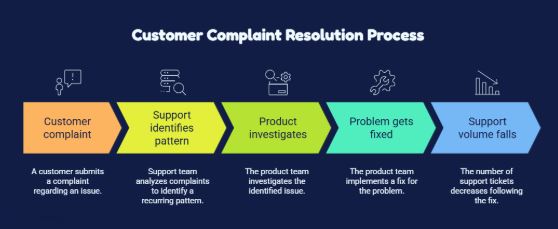
For example, if 300 customers ask how to find an important setting, that’s not necessarily a training problem.
It may be a product-design problem.
The product team could move the setting, rename it, improve onboarding, or add contextual guidance.
The result is better than answering 300 questions faster. You’ve eliminated the 301st question too.
5. Marketing Can Prevent Support Tickets Before They Exist
Marketing can also create… or prevent… support volume.
Suppose an advertisement says:
“Get unlimited access.”
But the product actually has a usage limit hidden in the terms.
Customers are going to ask about it.
The support department now has to clean up a communication problem it didn’t create.
Marketing should work with support to identify common misunderstandings around:
- Pricing
- Promotions
- Features
- Product limitations
- Subscription terms
- Returns
- Delivery
- Availability
Then turn those questions into clearer website copy, FAQs, comparison pages, guides, and onboarding content.
This creates a useful cycle:
Support questions → identify confusion → improve marketing/content → fewer questions
Your support conversations are effectively a free market-research database. Use them.
6. Sales Should Give Support the Full Customer Story
One of the quickest ways to frustrate a new customer is to make them start from zero after speaking with sales.
Imagine a salesperson has spent three weeks discussing a customer’s requirements, but once the deal closes, support receives only:
“New customer: John.”
That’s a terrible handoff.
Support should receive relevant information from sales, including:
- What the customer purchased
- Why they purchased it
- Special requirements
- Implementation details
- Important commitments
- Relevant account information
The customer shouldn’t have to become the messenger between your departments.
A good CRM and Omnichannel Inbox can help preserve that context so the support agent starts the conversation with information rather than questions
7. Finance and Operations Can Remove Their Own Support Bottlenecks
Billing questions are another good example.
If customers repeatedly contact support because invoices are confusing, payment failures aren’t communicated clearly, or refunds take too long, simply training support agents to answer faster won’t solve the underlying problem.
Finance can reduce support demand by improving:
- Invoice clarity
- Payment notifications
- Refund communication
- Subscription reminders
- Failed-payment alerts
- Billing FAQs
Operations can do the same by examining:
- Approval processes
- Order fulfillment
- Returns
- Escalations
- Internal handoffs
Ask one question whenever a support issue gets passed between teams:
“Why does this require a handoff at all?”
Sometimes the answer is legitimate.
Sometimes it’s simply how the company has always done it.
Those are the bottlenecks worth removing.
8. Build a Knowledge Base That Agents Actually Use
A knowledge base isn’t useful because you have 500 articles.
It’s useful when an agent can find the right answer in seconds.
Organize it around real customer problems rather than internal departmental structures.
Instead of:
Products → Features → Settings → Configuration
consider:
“How do I change my billing information?”
“Why isn’t my account syncing?”
“How do I cancel my subscription?”
“Why was I charged twice?”
Your knowledge base should answer the question the customer is actually asking.
Review it regularly using live-chat transcripts. If agents repeatedly ask supervisors the same question, that information probably belongs in the knowledge base.
Qiscus recommends combining accessible knowledge bases with automation, templates, conversation analysis, and agent context to reduce repetitive work.
9. Measure Efficiency Without Creating Bad Agent Behavior
You can’t improve what you don’t measure, but the wrong metric can make your support worse.
Don’t tell agents:
“Get your average handle time as low as possible.”
They’ll naturally start trying to end conversations faster.
Instead, look at several metrics together:
| Metric | What it tells you |
| First Response Time | How quickly customers get attention |
| First Contact Resolution | How often problems are solved without follow-up |
| Average Resolution Time | How long complete resolution takes |
| CSAT | How customers felt about the interaction |
| Customer Effort Score | How difficult it was to get help |
| Escalation Rate | How often agents need another team |
| Chat Abandonment | How many customers leave before being served |
First Contact Resolution is particularly valuable because it forces you to think beyond speed. Those who did get first-contact resolution were substantially more likely to purchase more, trust the brand, and recommend it. So don’t celebrate a 30-second chat if the customer has to come back tomorrow.
Celebrate the 30-second chat that actually solved the problem.
10. Turn Support Conversations Into a Company-Wide Feedback System
This may be the most overlooked efficiency strategy.
Every customer conversation contains information.
If customers repeatedly ask:
- “Where do I find this?”
- “Why can’t I do that?”
- “Why was I charged?”
- “When will my order arrive?”
- “Why does this feature not work?”
you have identified friction in your customer journey.
Create a weekly or monthly report showing your top recurring support issues.
For example:
| Issue | Monthly conversations | Owner | Action |
| Password reset | 420 | Support/IT | Improve self-service |
| Billing confusion | 280 | Finance | Rewrite invoice |
| Feature setup | 190 | Product | Improve onboarding |
| Delivery status | 160 | Operations | Add automated updates |
| Pricing questions | 120 | Marketing | Clarify website copy |
Now customer support isn’t just a cost center answering questions.
It’s an early-warning system for the entire business.
A Simple Customer Support Efficiency Playbook
If you’re starting from scratch, don’t try to implement everything at once.
Use this five-step playbook:
Step 1: Find your top five support issues
Look at your last 30–90 days of conversations.
Identify which questions consume the most agent time.
Step 2: Classify each issue
Put every major issue into one of four categories:
Automate → Document → Fix → Escalate
- Automate: repetitive and predictable
- Document: needs a human but has a standard solution
- Fix: caused by a product/process problem
- Escalate: genuinely requires specialist intervention
Step 3: Build your live-chat workflows
Set up automated greetings, basic qualification, routing, saved responses, and escalation paths.
Step 4: Connect departments
Assign an owner to recurring problems.
If support reports 200 billing complaints, Finance owns the investigation—not the support agent who happens to receive the complaints.
Step 5: Measure the outcome
Track FRT, FCR, resolution time, CSAT, escalation rate, and chat abandonment before and after your changes.
Then repeat the process.
That’s how support efficiency becomes a continuous improvement system rather than a one-time project.
The Bottom Line
Customer support efficiency doesn’t come from asking your agents to handle more conversations.
It comes from making every conversation easier to handle and harder to get wrong.
Automate the questions that don’t need a human. Give agents the customer context they need. Build your knowledge base around real problems.
Use Smart Routing to send conversations to the right people. And, most importantly, use every support interaction to identify what’s creating friction elsewhere in the customer journey.
That’s where live chat can make a real difference.
With SupportSuite247, you can give customers a direct line to your support team while giving agents the tools to respond faster and manage conversations more effectively.
Explore our Pricing to find the plan that fits your support operation.
Don’t make customers work harder to get help.
Give them a faster way to reach you, and give your team a smarter way to respond.
Ready to make customer support more efficient?
Start using SupportSuite247! Sign Up and turn every customer conversation into a faster, more connected support experience.